
Sessions and Identity
Every time your app starts, CodeScout opens a session and attaches it to every log written from then on. You get that for free. What you do not get, unless you ask, is any idea who was using the app, because CodeScout never infers identity.
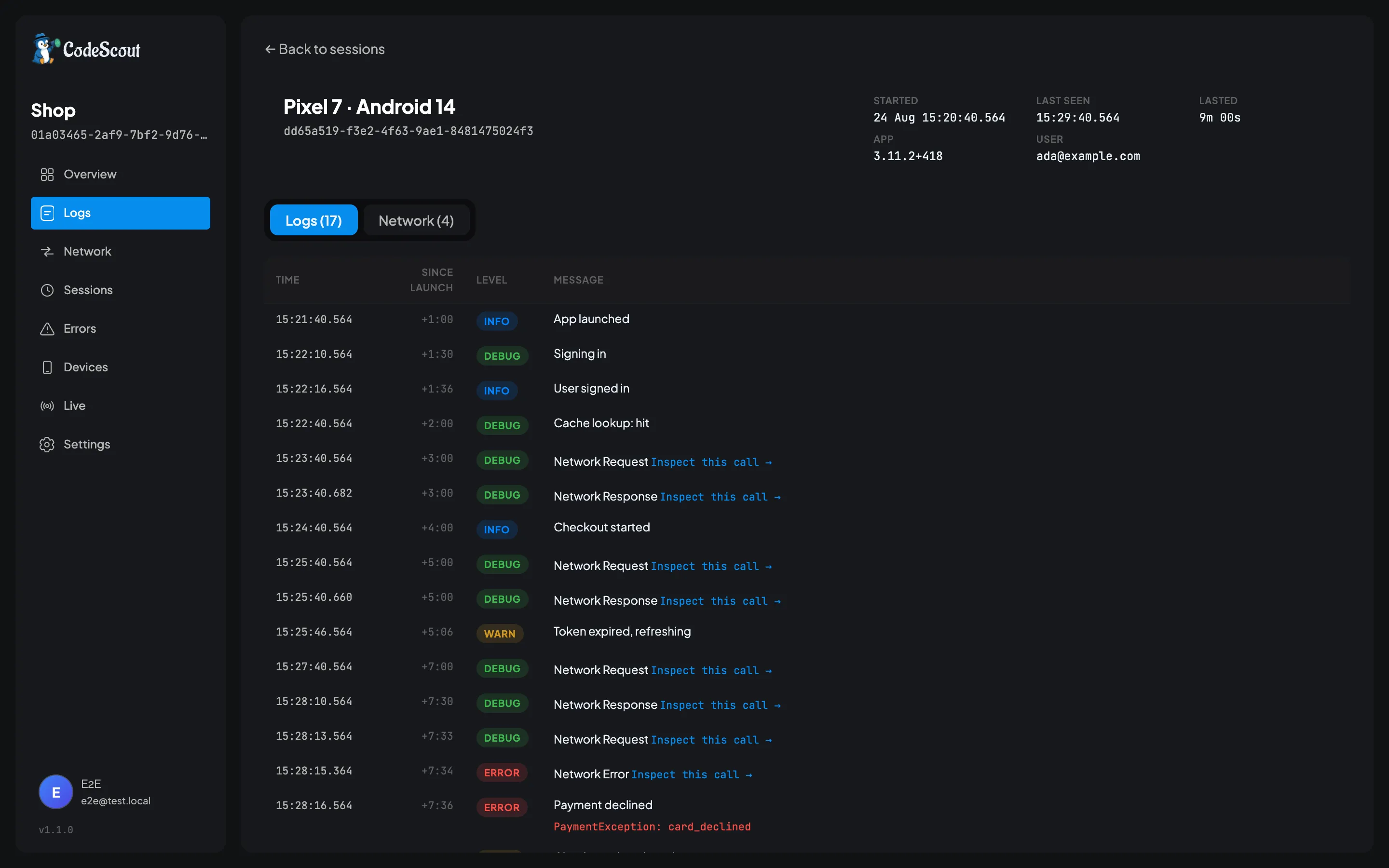
A session is what turns a pile of log lines back into a story: one launch, in order, with the time since launch on every row and the device and build it came from.
The three ids
Section titled “The three ids”Session id. One launch of the app. It changes every time the app starts, and it is always present.
Installation id. Stable across launches on the same install. It is a random value generated the first time your app runs and kept in CodeScout’s own local storage, so it follows a phone rather than a person and disappears if the app is uninstalled. It is not a device id and there is no way to recover it once it is gone.
User id. A person, and only ever set by you:
await CodeScout.instance.setUser('user_4821', traits: { 'plan': 'pro', 'team': 'acme',});Call setUser(null) when they sign out.
Two things about setUser
Section titled “Two things about setUser”It has to be called after init(). There is no session to attach anything to before that, so a
call made earlier returns quietly and nothing happens. If you set the user from a stored token at
startup, make sure init() has completed first.
Traits replace rather than merge. Calling setUser('u1', traits: {'plan': 'pro'}) and later
setUser('u1', traits: {'team': 'acme'}) leaves you with the team and no plan. Pass the whole
map every time.
It applies to the whole launch, retroactively
Section titled “It applies to the whole launch, retroactively”Sessions are re-sent with every upload and updated on the server rather than duplicated, so
calling setUser() after somebody signs in names the whole launch, including everything logged
before they signed in.
That is usually what you want, because the bug often happened on the login screen. It is worth knowing if you are careful about what gets attributed to whom: the logs from before sign-in belong to that session too, and the session now has a name on it.
What a launch records on its own
Section titled “What a launch records on its own”Alongside the ids, each session carries the device model, the OS name and version, your app’s version and build number, the CodeScout SDK version, and when it started and was last seen.
The SDK version is there so you can answer “is this phone running a build old enough to be missing the fix”, which is otherwise a question nobody can answer without asking the developer.
Finding things by who and what
Section titled “Finding things by who and what”The log viewer understands six filters that describe the launch rather than the log:
| Filter | Matches | Example |
|---|---|---|
user: | Exactly | user:ada@example.com |
installation: | Exactly, and it must be the whole id | installation:4f2a81b0-9d3e-4c11-8a77-2b6c0f5e1d42 |
app_version: | Exactly | app_version:3.11.2 |
sdk_version: | Exactly | sdk_version:1.5.0 |
device: | Loosely, ignoring case | device:Pixel |
os: | Loosely, name or version | os:Android or os:14 |
installation: takes the full id. A shortened one is refused rather than treated as a prefix, so
copy the whole thing rather than the first few characters.
app_version: is exact on purpose. Prefix matching would be convenient and treacherous, because
3.1 would quietly also match 3.11.2 and you would draw the wrong conclusion from the result.
The screens
Section titled “The screens”Sessions is one row per launch, showing the device, who was on it, when it started, and how many logs, errors and network calls it produced. Open one and you get that launch’s logs and its network calls as two tabs, with each row showing how long after startup it happened, so you can read a launch as a sequence rather than as a pile.
Devices rolls launches up by installation id, so you can see one phone over time. That is how you tell a bug that happens to everybody from one that happens to one person on one handset.
When a session ends
Section titled “When a session ends”A session lasts as long as the app process does. Backgrounding the app does not end it, and it does not time out. It ends when the process ends, and the next launch opens a new one.
Why a launch might be missing
Section titled “Why a launch might be missing”If a launch is not on the Sessions screen at all, the usual reason is sampling. A launch that was sampled out writes nothing to the database and therefore uploads nothing, session included. The Info screen inside the app tells you whether the launch you are holding was kept.
The other reason is that the logs simply have not uploaded yet, since the default interval is five minutes.
Identity is opt-in, on purpose
Section titled “Identity is opt-in, on purpose”Nothing about a person appears against a session until you call setUser(). CodeScout does not
read a device id, an advertising id, or anything else that would let it guess.
That means the name you attach is one you already have and are already responsible for. If you
are subject to a data deletion request, the user id and traits are ordinary columns on the
sessions table, so one UPDATE clears them. Retention will not do it for you: it deletes logs
once they are past the window and leaves the session rows where they are.