
Errors and grouping
An app with a thousand users generates the same failure a thousand times. Read that as a list and the bug that started an hour ago sits three hundred rows below the one you already know about.
The Errors screen groups them, so one bug is one row with a count beside it.
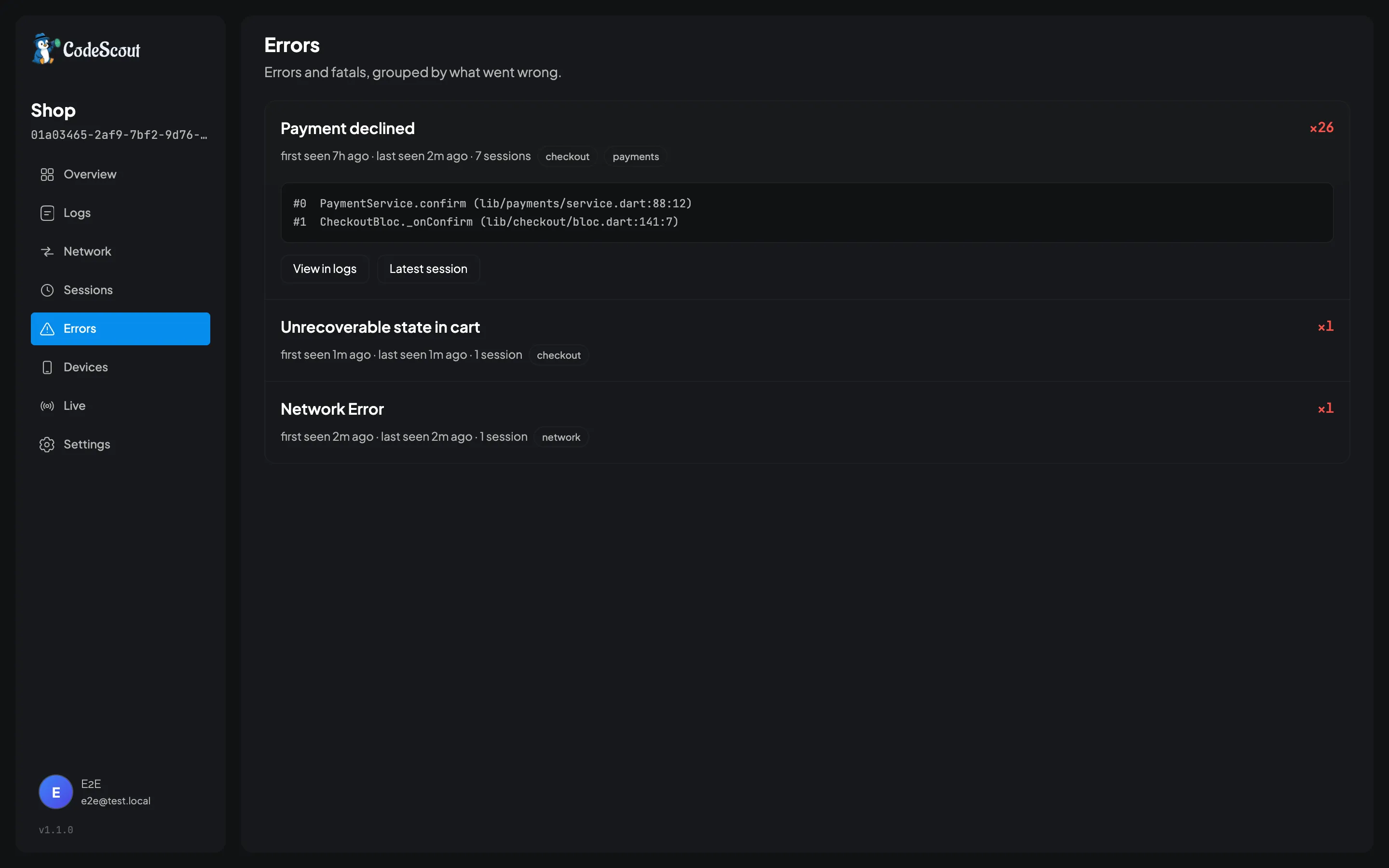
Getting errors into it
Section titled “Getting errors into it”Anything you log at error or fatal appears here. There is nothing to switch on.
try { await payments.confirm(order);} catch (e, stack) { CodeScout.instance.e( 'Payment declined', error: e, stackTrace: stack, tags: {'checkout', 'payments'}, metadata: {'order': order.id, 'total': order.total}, );}Pass stackTrace and it is parsed into frames, so the dashboard can show you file and line rather
than a wall of text. Pass metadata for the things that differ between one occurrence and the
next: the order id, the user’s plan, whatever you will want when you are looking at this in three
weeks.
Network failures arrive here on their own. The interceptors log a failed
call at error, so you do not have to catch anything for them to show up.
How grouping works
Section titled “How grouping works”The grouping key is computed once, when the log is ingested, and stored as an indexed column. It is not a search that runs when you open the page, which is why the screen is fast on a project with millions of rows.
Ordinary errors group on the message with its varying parts blanked. Uuids, quoted strings, hex
runs, numbers, and identifiers that mix letters and digits like ord_8812f are all replaced before
the key is computed, so these are one row:
User 4821 not found → User {n} not foundUser 9134 not found → User {n} not foundOrder ord_8812f rejected → Order {id} rejectedThat is what lets you write a message with the offending value in it, which is the message you actually want at 2am, without turning every occurrence into its own group.
Only the first line is used. An error whose message carries its own stack trace would otherwise never match another occurrence of itself.
Network failures group on the method and the normalised path instead. Every network failure the
SDK reports carries the literal message Network Error, so grouping those on the message would
collapse every broken endpoint in your app into one useless row. Grouping on method plus path keeps
POST /v2/pay and GET /v2/cart apart, and keeps GET /v2/user/4821 and GET /v2/user/9134
together.
What that means for your messages
Section titled “What that means for your messages”Write the message as a description of the problem and put the specifics in metadata. These group
well:
CodeScout.instance.e('Payment declined', metadata: {'order': order.id});CodeScout.instance.e('Cache miss on cold start', metadata: {'key': key});The failure mode to avoid is the opposite of what you might expect. A message built entirely out of variable parts does not split into one group per occurrence: blanking eats all of it, so every such message collapses to the same key and unrelated failures land in one row together.
// Avoid: this blanks to "{id} {n} {n}-{n}-{n}T{n}:{n}:{n}", and so does every// other error whose message is nothing but values. They all become one group.CodeScout.instance.e('${order.id} ${order.total} ${DateTime.now()}');Leave some prose in the message and the problem disappears.
A response body your model could not read is the same question. Name the endpoint in the message,
and pass the call’s id as requestId:
CodeScout.instance.e('Could not read GET /v2/cart', error: e, stackTrace: st, requestId: response.codeScoutRequestId);That message is grouped as Could not read GET /{id}/cart, so each path is a row of its own apart
from the blanked parts: /v1/cart and /v2/cart share a row, since v1 and v2 mix a letter and
a digit. Could not parse response would put every endpoint in one. The request id plays no part in
the grouping. It is what takes you from the error to the body that caused it, as
When the API changes under you describes.
Working from a group
Section titled “Working from a group”Each row carries the count, how many sessions it touched, and when it was first and last seen. First seen is the one people forget to read: a bug first seen four minutes ago is a different conversation from one that has been happening quietly since March.
Open a row and you get the latest stack trace, plus two ways out:
- View in logs takes you to every occurrence, not just the one on the row. It is a search for the group’s fingerprint, so it survives a reload and can be pasted to someone else.
- Latest session opens the launch it last happened in, which is usually the fastest way to see what the person was doing when it went wrong.
An error logged with a call’s request id has one more way out. Expand an occurrence in the log viewer and its Request link opens the call’s own page, where the error is listed above the call’s request and response.
Reading it from an agent
Section titled “Reading it from an agent”get_error_groups returns the same list, and search_logs takes a fingerprint:"…" clause for
one group’s occurrences. So “what is the newest error in production and what caused it” is a
question you can hand to a coding agent rather than answer by hand.
See Reading it with an AI agent.
What this is not
Section titled “What this is not”CodeScout does not catch errors for you. There is no FlutterError.onError hook installed and no
zone guard, because a logging SDK that quietly swallows your error handling is a bad neighbour, and
you may well already have Crashlytics or Sentry doing exactly that.
If you want uncaught errors here too, wire it yourself in one line:
FlutterError.onError = (details) { CodeScout.instance.f( details.exceptionAsString(), error: details.exception, stackTrace: details.stack, ); FlutterError.presentError(details);};Keep the presentError call unless you mean to replace your existing reporter, not sit beside it.
- Sessions and identity — the launch an error happened in
- Network inspection — where network failures come from
- Writing logs — levels, tags and metadata in full