
Network Inspection
Add one line to the HTTP client you already have and every call your app makes is captured: the method, the URL, the status, how long it took, the headers, and both bodies. Including the calls that failed, which are usually the ones you came for.
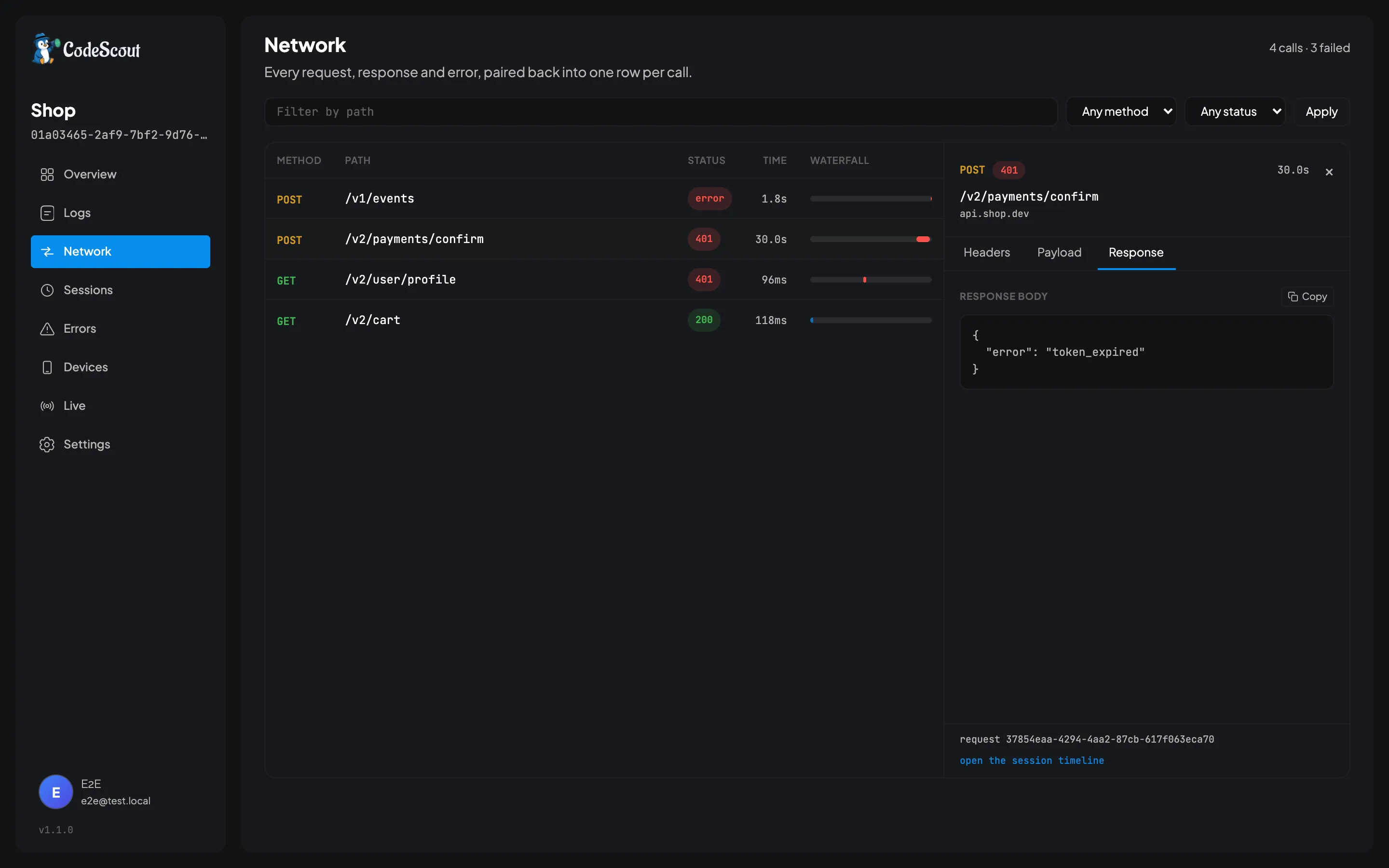
Each call arrives as up to two log entries: one when the request goes out, and one for its response or its error. The dashboard pairs them into the single row above. That detail matters exactly once, when you are looking at the raw logs and wondering why one request appears twice.
Interception lives in a companion package rather than in the core, so adding CodeScout to an app
never drags Dio or package:http in behind it. Install the one that matches the client you already
use.
flutter pub add code_scout_dioimport 'package:dio/dio.dart';import 'package:code_scout_dio/code_scout_dio.dart';
final dio = Dio();dio.interceptors.add(CodeScoutDioInterceptor());Dio treats a 4xx or 5xx as an error rather than a response, because that is what its default
validateStatus does. Those calls therefore arrive through the error path and are logged at
error level, so a plain 404 appears under Errors as well as under Network. That is usually what
you want, but it surprises people the first time.
package:http
Section titled “package:http”flutter pub add code_scout_httpimport 'package:http/http.dart' as http;import 'package:code_scout_http/code_scout_http.dart';
final client = CodeScoutHttpClient(client: myExistingClient);
final response = await client.get(Uri.parse('https://api.example.com/users'));Pass your existing client in through client:. If you leave that argument out, the wrapper
quietly builds a plain new http.Client, and any base headers, proxy or timeout you configured
on yours are gone.
CodeScoutHttpClient extends http.BaseClient, so it works anywhere a client does, including
being handed to a generated API client.
Unlike Dio, package:http does not treat a 4xx or 5xx as a failure, so those arrive as ordinary
responses and keep their status code. Only a genuine transport failure, such as a refused
connection, is recorded as an error.
One behaviour is worth knowing. A streamed response can only be read once, so the wrapper reads the whole body into memory in order to record it and then hands your code an equivalent response backed by those bytes. Your code sees no difference, but a very large download is buffered rather than passed straight through.
Up to two logs per call
Section titled “Up to two logs per call”A call writes one log when the request goes out, and at most one more: a response or an error, never both, because whichever arrives first claims the pending request.
| Log | When | What it carries |
|---|---|---|
request | Before sending | Method, URL, headers, body |
response | When a response arrives | Status, headers, body |
error | When the call fails | The error, and the status code if there was one |
request_id: 9c07-3d55├── request → POST /v2/checkout/session└── response ← 201 CreatedBoth logs share a request id. The dashboard and the in-app panel use it to show them as one row per call, working the duration out from the two timestamps rather than reading it off either log.
Your app can put that id on a log of its own, such as the error its model threw on the response body. That log is shown with the call, under Logged by the app, but it is not a third log of the call. It is not a network log, so it never changes the call’s status, duration or count, and a call that answered 200 is still a 200. When the API changes under you walks through it.
A call whose answer is never recorded keeps only its request log, and is shown as pending rather than being silently dropped. That is usually the one you were looking for. It happens when:
- The app was killed before the answer came, for example while it sat in the background.
- The answer took more than two minutes, as the next paragraph explains.
- With
code_scout_http, the response body broke off part way through. Your code gets the exception, but CodeScout records neither a response nor an error. - With Dio, another interceptor rejected the call after CodeScout’s saw the request but before it saw the response. When the API changes under you covers that case.
CodeScout holds each request in memory while it waits for the answer, and discards one that has waited more than two minutes, so a long-running app does not hold them forever. An answer that arrives after that is dropped. The discarding happens when the app makes its next call rather than on a timer, so an app that has gone quiet keeps whatever it was holding until it starts talking again.
Reading them back
Section titled “Reading them back”You do not need the dashboard for this. The in-app panel has a Network tab that lists every call this launch made, with a search box for the path and filters for failed, slow and pending. Tap a row for its request, response and timing. Anything your app logged about the call with its request id is listed at the top of the response.
On the dashboard, the Network screen puts the same list beside a split inspector, so clicking a row shows its headers, body and timing without the list reloading or losing your place. Anything your app logged about the call sits above the inspector’s tabs, so it stays in view whichever tab is open. The screen also draws a waterfall, which is the quickest way to see that one call is holding everything else up.
Four states are distinguishable at a glance. A call can have completed, failed, or still be pending, which is a call with only its request log, for one of the reasons above. The fourth is orphaned: a response with no request beside it. A call’s two logs can be split across two uploads, and if the batch carrying the response lands first the dashboard has half a call for a while. It normally resolves itself once the other batch arrives.
The Network tab is empty
Section titled “The Network tab is empty”If you added an interceptor and nothing appears, there are two likely reasons and the panel can tell them apart for you.
The first is the level. Network request and response logs are written at debug level, and
minimumLevel defaults to info, so at the default they are dropped before they reach anything.
Set LogLevel.all while you are working.
The second is that the interceptor is not actually installed. Open the panel, tap the info icon, and look at the network interception list. Each companion package announces itself the moment you construct it, so the Info screen distinguishes a package that is missing from one that is present but has not seen a call yet.
There is a third, less obvious cause. Every network log carries exactly one tag, network, so if
you have set enabledTags to a specific list without including network in it, you have
switched off HTTP capture entirely.
Bodies
Section titled “Bodies”Bodies over 32 KB are truncated, and a note is appended saying how large the whole body was, so you know what you are missing. That is not about secrets: a single response can run to megabytes, and uploading it off somebody’s phone is a cost they pay in data.
The limit is maxBodyBytes on RedactionBehavior, which is where it lives because both the
truncation and the redaction rewrite the same body:
CodeScoutConfiguration( redaction: RedactionBehavior.recommended(maxBodyBytes: 64 * 1024),)Set it to 0 to keep everything.
Because the body is rewritten before it is stored, CodeScout does not know the size of the
original response unless the companion package measured it first. package:http measures it, so a
call captured through that wrapper shows its size in the in-app panel’s Network tab. Dio does not
record one, and neither does the dashboard, so those rows show a dash.
Credentials
Section titled “Credentials”Nothing is hidden unless you ask for it, because the token is sometimes exactly why a request is failing. That is a deliberate default for development and the wrong one for production. When you want headers or body keys stripped, name them. See Redaction and Privacy.