Watching a Device Live
Most logging tools answer questions about the past. This one lets you watch a device while somebody is holding it, which is the difference between reading a report of a bug and seeing it happen.
The situation it is built for is ordinary. QA is at one desk and you are at another, or on the other end of a call. They can reproduce it and you cannot. Instead of shipping a build with more logging and waiting a day, you watch their screen’s worth of logs while they do the thing.
This is a tool for the people testing your app, not for the people using it. Pairing needs somebody to open the panel and read you a code, and the panel is something you take out of the build before it ships.
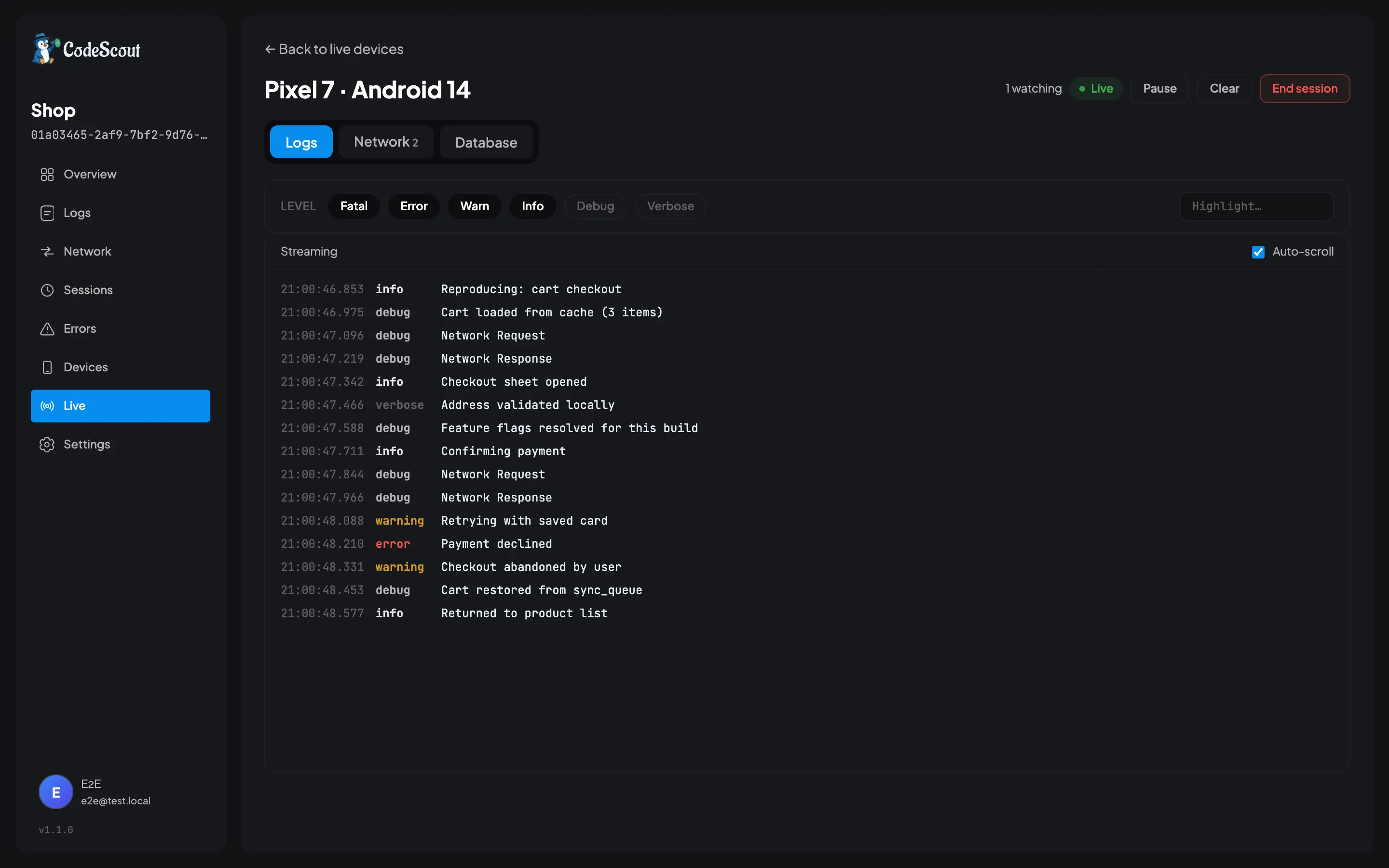
The three tabs are the whole feature. Logs is what you see above, arriving as they happen. Network pairs each call’s phases together in the browser as the frames land. Database reads the app’s own local storage off the phone, which has its own page.
Pairing
Section titled “Pairing”- In the dashboard, open Live in the project’s sidebar and press New session. A six character code appears.
- On the phone, tap the CodeScout floating button. At the top of the sheet is a pill reading Go live. Tap it, type the code, and press Connect.
The pill reads Pairing while the connection comes up, then Live for as long as the session lasts, so the person holding the phone can always see that they are being watched.
That is the whole setup. Nothing is installed and the tester needs no account.
About the code
Section titled “About the code”Six characters, and the alphabet leaves out every pair people misread. There is no 0 or O,
no 1, I or L, no 5 or S, and no 8 or B. You are going to read this down a bad
phone line, so that matters more than it looks.
The field upper-cases what you type and quietly ignores anything outside that alphabet. If a key seems to do nothing, you are pressing a character a code cannot contain.
A code is single use and expires after five minutes. Only the person who minted it can see it, because until a device claims it, a code on a screen is a credential.
The code decides which session a device joins. It never decides whether it may connect at all, because that is settled by the project credentials the app was built with, before the code is even read.
What arrives
Section titled “What arrives”Every log the launch captures appears on the dashboard as it happens. Captured is the
operative word: your minimumLevel and any tag filter still apply, so a log the SDK never made
is not one the stream can show you.
Sampling is the exception. It does not apply to a live session at all. Somebody who deliberately paired with a device should see everything it does, so a sampled-out launch still streams in full.
The watch screen has three tabs.
Logs is the stream itself, with the same level filters as the log viewer.
Network pairs each call’s request and response back together as they arrive, so you get one row per call rather than two entries.
Database browses the app’s own local storage, which is covered in Browsing Local Storage.
Nothing is stored
Section titled “Nothing is stored”A live session writes nothing to your server. It is a socket, some facts about the phone, and a fan-out to whoever is watching, all held in memory and all gone when it ends.
That is what makes it safe to point at a build you would not want in your stored logs, and it is also why there is no way to go back and read a session afterwards. If you want a permanent record, that is what ordinary uploading is for, and the two run happily at the same time.
If you look away
Section titled “If you look away”Every event carries a sequence number, so a browser that reconnects after a blip is sent what it missed rather than silently resuming from the present.
The server keeps the last 512 events per session for that purpose. If you were away long enough to fall past the end of it, the page tells you how many events it could not replay and draws a marker in the timeline. A gap you can see is much better than one you cannot.
Ending it
Section titled “Ending it”The session ends when you stop it, when the app closes or is backgrounded long enough for the operating system to suspend it, or when the network drops for good. Restarting the server also ends every session it was holding, since none of it is written down.
Closing your browser tab does not end the session. It stops you watching, and the device stays connected until something else ends it, so use End session if you want it actually finished.
Driving it from code
Section titled “Driving it from code”You do not have to use the panel:
final started = await CodeScout.instance.startLiveSession('4K7Q2P');
if (!started) {  // The code was wrong, expired, already used, or the server is unreachable.}
// ...
await CodeScout.instance.stopLiveSession();
startLiveSession never throws. It returns false for anything that went wrong, because a
mistyped or expired code is the common case rather than an exceptional one.
CodeScout.instance.isLiveStreaming tells you whether a session is running right now, which is
useful if you want to show something in your own UI while it is.
Only for your team
Section titled “Only for your team”Live sessions are for developers and testers, not for your app’s users, and the design assumes that. Everything is held in one server process, so the ceiling is the size of your team rather than the size of your user base.
The one real constraint is that this needs a single server process. Two replicas break live sessions, because the browser can reach one node while the device’s socket is held by the other. If ingest volume ever forces you to run more than one, live sessions are the thing to fix first.