
Browsing Local Storage
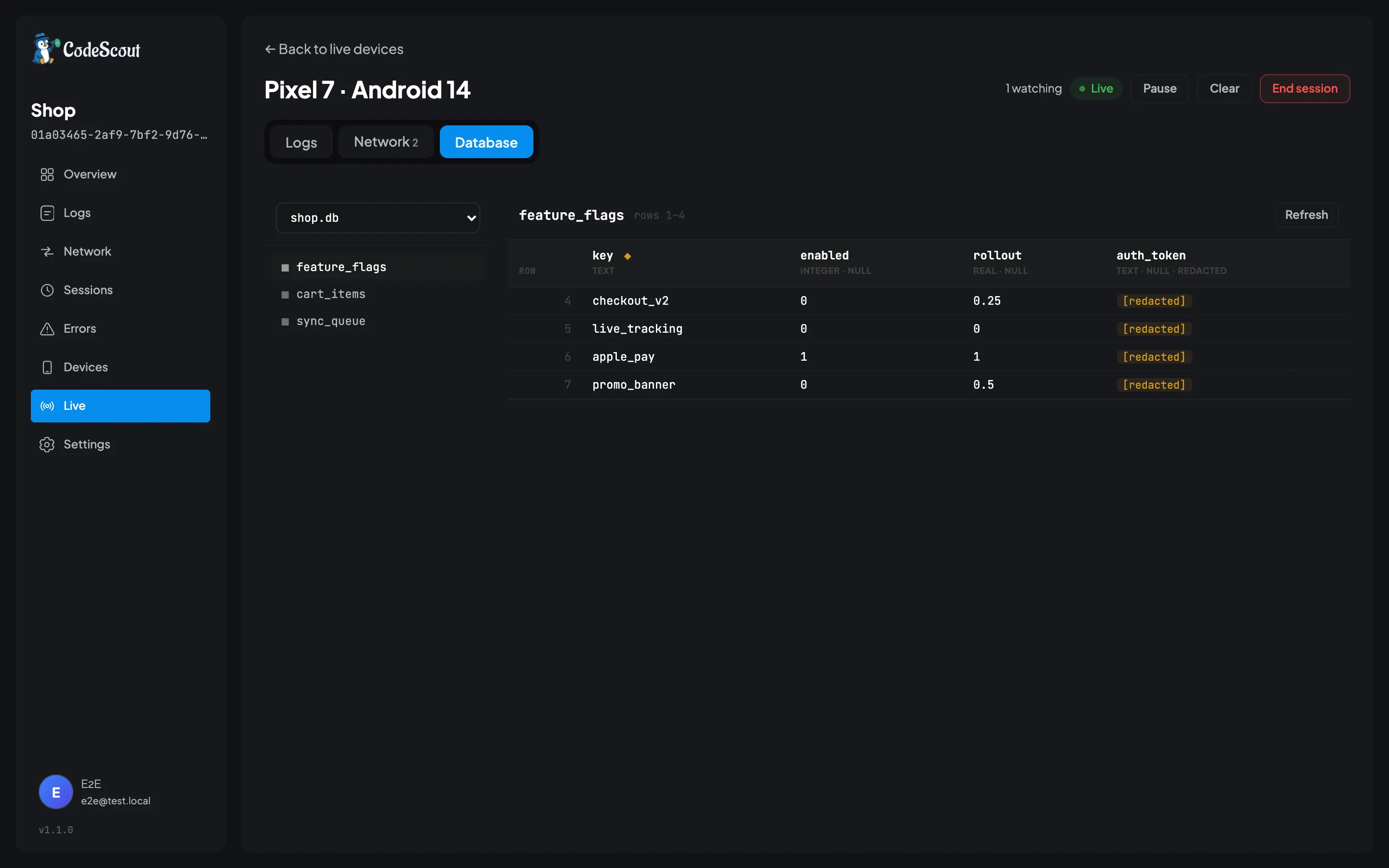
While a device is in a live session, the dashboard can browse the storage the app keeps on the
phone. SQLite tables, shared_preferences, Hive boxes: you page through the rows, sort them,
filter them, and change one value at a time.
This is for the questions that logs cannot answer. Why is this user seeing the old price? Which feature flag is actually set on this build? Did the migration run? You can see the answer on a device somebody else is holding, in another city, without asking them to read a screen to you.
Nothing is stored on the server. The rows you are looking at came off the phone when you asked for them, and they are gone when you close the tab.
Offer a database up
Section titled “Offer a database up”Nothing is browsable until your app names it. Add one line where you set the SDK up:
import 'package:code_scout/code_scout.dart';import 'package:sqflite/sqflite.dart';import 'package:flutter/foundation.dart';
final db = await openDatabase('shop.db');
CodeScout.instance.registerDatabase(  'shop.db',  CodeScoutSqflite(db),  writable: kDebugMode,);
Pass the open connection, not a file path. That way WAL mode, SQLCipher and attached databases all keep working, because this is the same connection your app already reads through.
Register as many as you like. Each one needs its own name, and the dashboard shows them in the order you registered them.
Preferences, Hive and anything else with a key
Section titled “Preferences, Hive and anything else with a key”Anything that is a bag of keys and values fits the same screen. You pass three closures rather than the package’s own types, so none of them becomes a dependency of your app just for a debugging feature:
CodeScout.instance.registerDatabase( 'prefs', CodeScoutKeyValue( keys: () async => prefs.getKeys(), readKey: (k) async => prefs.get(k), writeKey: (k, v) async => v == null ? prefs.remove(k) : prefs.setString(k, '$v'), ), writable: kDebugMode,);Leave writeKey out and the store is readable but never editable.
Look at it
Section titled “Look at it”- Pair the device, the same way you would to watch it live.
- Open the session and choose the Database tab.
- Pick a table on the left.
Click a column heading to sort by it, and page through with the arrows at the bottom. Every one of them is a fresh question put to the phone, so give it a moment on a slow network.
Change a value
Section titled “Change a value”Click a cell, type the new value, and save. Two things have to be true first:
- The app registered that database with
writable: true. - Your dashboard account can manage the project.
Reading is open to anyone who can read the project, because it shows you the same kind of thing the log viewer does. Writing reaches into somebody’s device and changes what is stored there, so it sits with rotating a project secret rather than with reading logs.
Some cells are read only whatever you set. A blob (shown as a size), a string too long to send whole, and a value the SDK redacted are all in that group, for one reason. Saving carries the old value back to the device so it can check nobody else changed the row first, and a value you were never shown cannot be compared against anything.
Some whole tables are read only too. An edit addresses a row by its rowid, and a view and a
WITHOUT ROWID table have none, so their rows can be read but not changed. The dashboard says so
on the table itself rather than letting you discover it cell by cell.
If the row did change under you, the save is refused and the dashboard shows you the current value instead of overwriting it.
Every successful edit writes a line into the app’s own log stream, at system level, saying
which database and column changed and who did it. It syncs with everything else, so it is still
there three weeks later when somebody asks why this device’s data looks odd.
Why this is safe to ship in a debug build
Section titled “Why this is safe to ship in a debug build”The dashboard never sends SQL. It has five things it can say: list the databases, list the tables, describe a table, read a page, change one cell. None of them has a field a statement could go in. Your device builds every query itself from its own schema. Read only is a property of what the dashboard is able to express, not a rule that something has to remember to enforce.
Nothing is browsable until you name it. There is no scanning for *.db files. Scanning would
find CodeScout’s own log store, some plugin’s cache, and eventually an encrypted file it cannot
open, and you could not tell what you had exposed by reading your own code.
This is the opposite of redaction, which hides nothing unless you name it. The inversion is deliberate. A log is something your app chose to write. A database is everything your app has.
Registration is ignored in release builds. registerDatabase does nothing when
kReleaseMode is true, unless you pass allowInRelease: true. Wrapping the call in
if (kDebugMode) is not needed, though it does no harm.
Reading it on the phone
Section titled “Reading it on the phone”You do not need a dashboard or a live session to look. Once your app has called
registerDatabase, a Data icon appears in the header of the in-app panel, and it browses the same
sources on the device itself: pick a source, pick a table, read the rows, open one.
Browsing there is always read only, whatever writable is set to. Editing runs through the
dashboard, which carries the old value back so it can detect a conflict, needs manage rights on
the project, and gives you the whole cell and a real keyboard. A phone gives you none of those.
Editing needs a live session. A live session needs a pairing code from your dashboard, typed into the app. There is no way to reach a device that is not currently paired.
Limits
Section titled “Limits”The device decides these, not the dashboard, so nothing you send can raise them:
| Limit | Value |
|---|---|
| Rows in a page | 100 from a SQLite table, 500 from a key-value store |
| Characters in a cell | 4096 |
| Bytes in one reply | 512 KB |
A page stops early when the rows are getting too big to send, and the dashboard says so rather than pretending the table ended.
When it does not work
Section titled “When it does not work”“The device did not answer.” The socket is fine and the app is in the background. iOS and Android both suspend a backgrounded app, so its answer is late rather than lost. Bring the app to the front and try again.
“The device is no longer connected.” The session is over. Pair again.
“No databases registered.” The app has not called registerDatabase, or it is a release
build and the call was ignored.
Nothing loads at all, and the live stream is empty too. That is usually a reverse proxy, not this feature. See the reverse proxy section of Server Setup.
What it does not do
Section titled “What it does not do”Adding and deleting rows are deliberately not here. Changing a feature flag or a cached price is the thing people actually need on a device in front of them. Deleting a row is the one that loses data with no undo.
ObjectBox and Isar are not supported and are not planned. Neither can be enumerated without the app’s own generated model, so there is nothing generic to browse.