
See what your Flutter app is doing while it is doing it
Attached to your machine you can see everything. On a QA device, nothing. CodeScout keeps the logs, the network calls and the app's own stored data visible wherever the build is, and to whoever is holding it. Free, open source, and it runs on your own server.
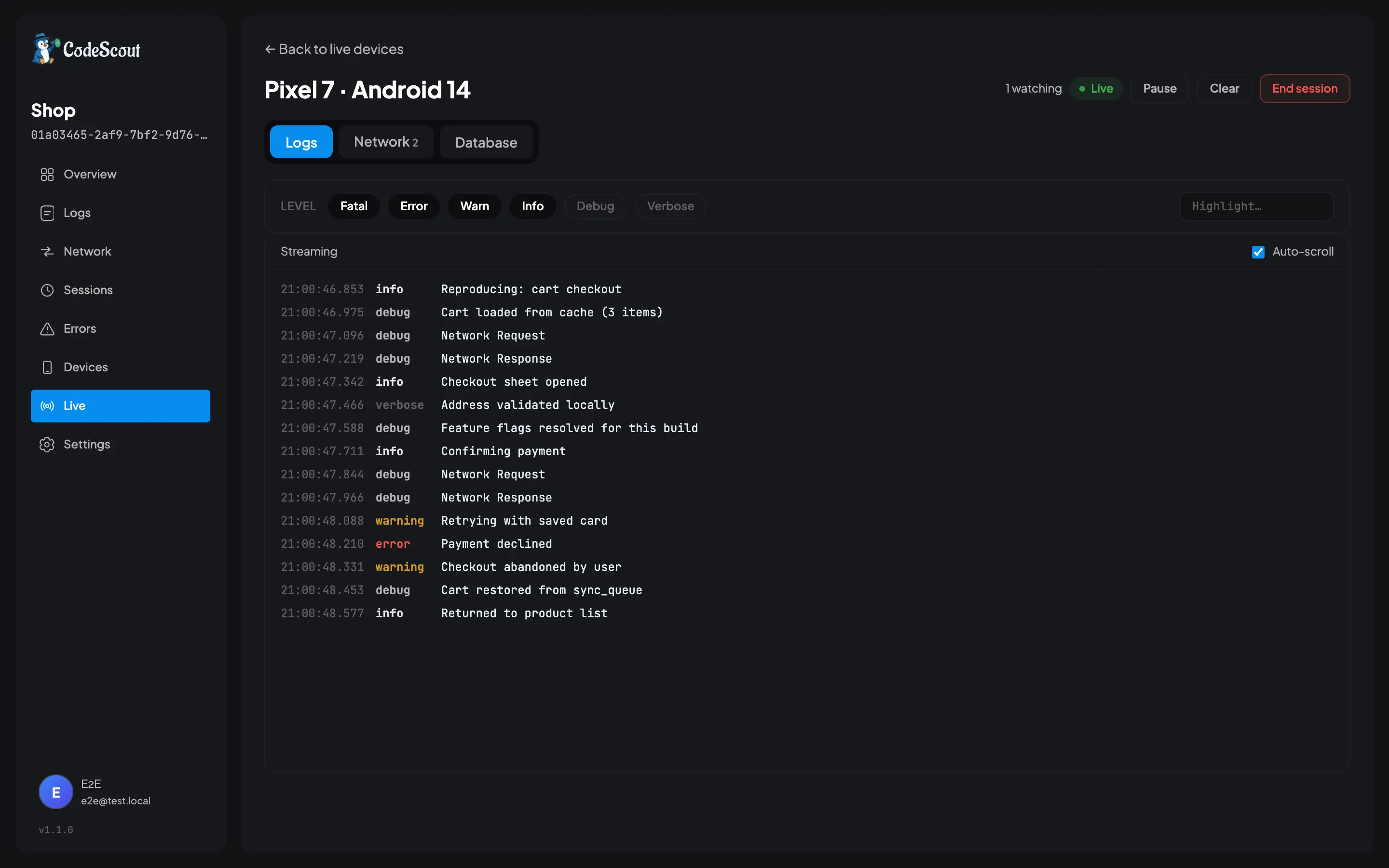
- Live device streaming
- Local database browser
- Network inspection
- Self-hosted

No server required
Two minutes in, before you host anything
Add the package and call init().
You get colour coded console output and a panel inside your own app, opened from a
floating button. No account, no signup, and nothing leaves the phone. That is a real
way to use CodeScout rather than a trial of it.
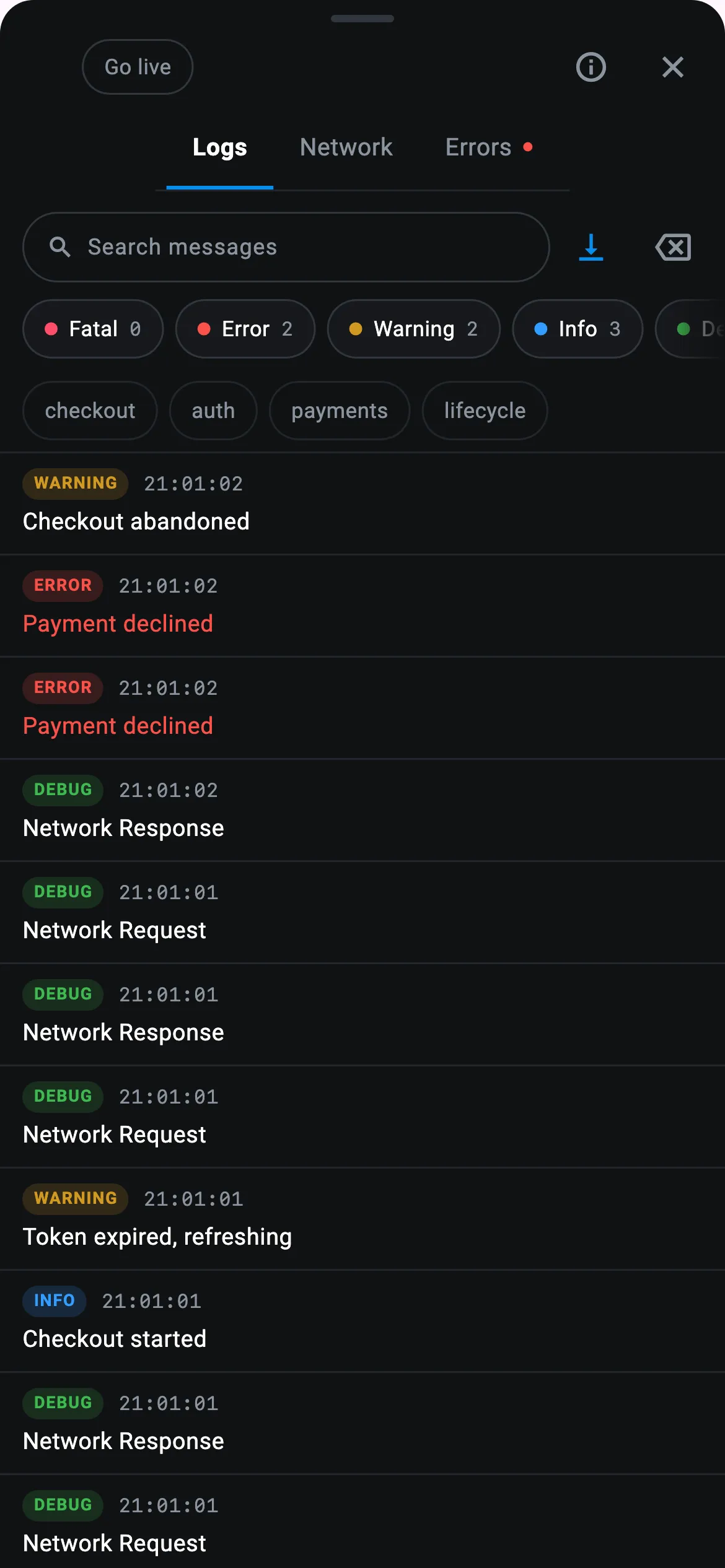
Logs
Everything this launch has written, with the levels and tags as filters. Searchable on the phone.
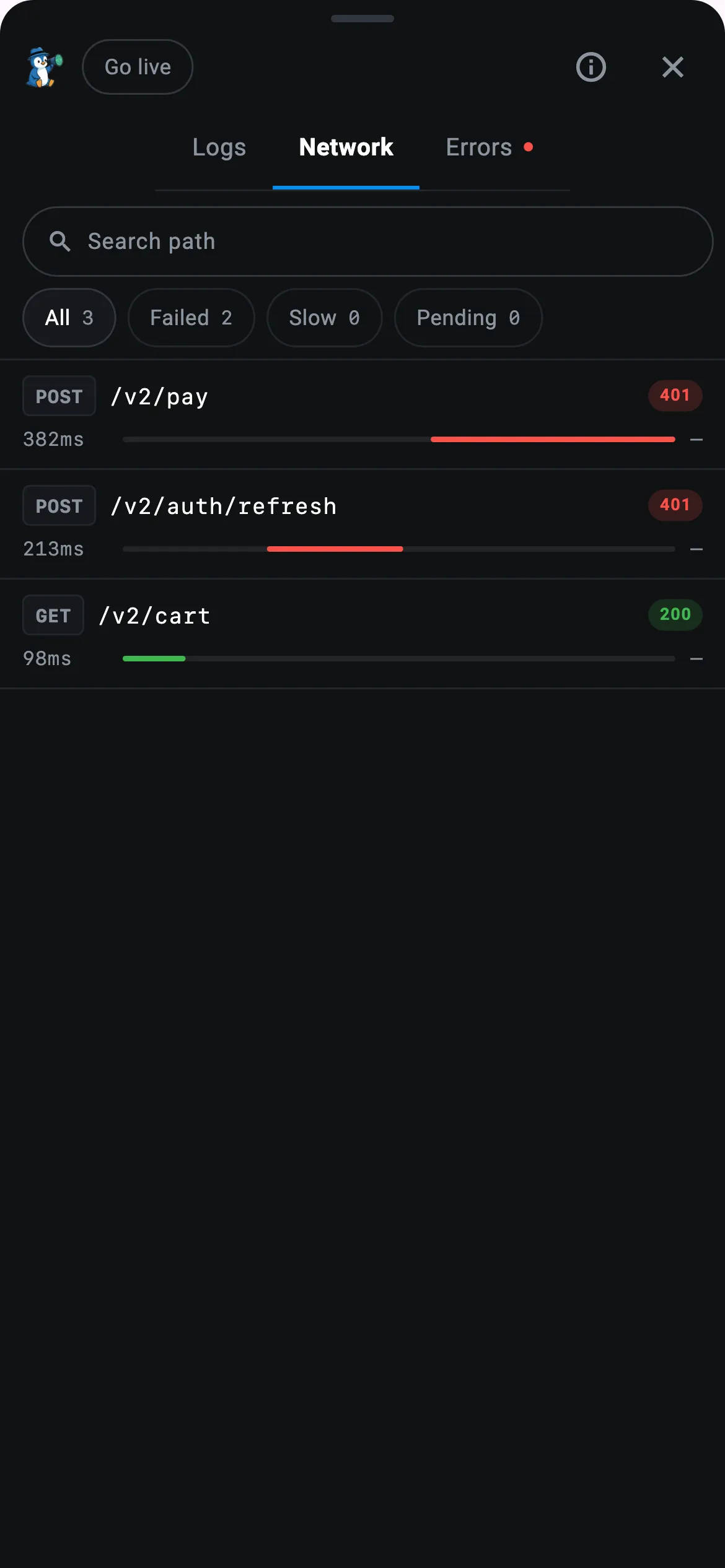
Network
One row per call with its status and how long it took, and both bodies a tap away.
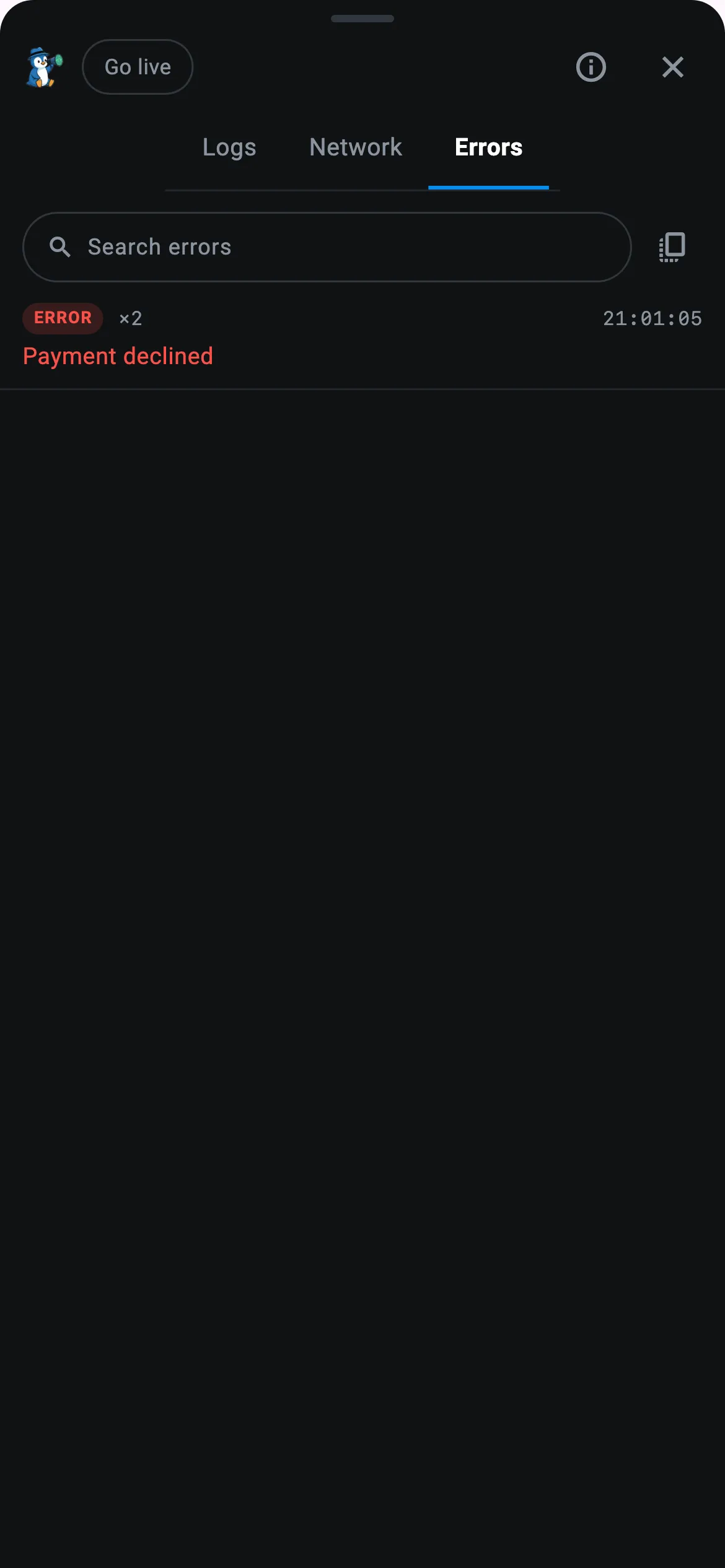
Errors
The failures on their own, already counted, so fifty copies of one bug are still one line.
Two more screens sit behind icons in the panel's header. Data reads
your app's own SQLite tables, shared_preferences and Hive boxes on the
device. Info runs a connection test and tells you which step failed,
which is the answer to "why is nothing arriving" more often than not.
Logs
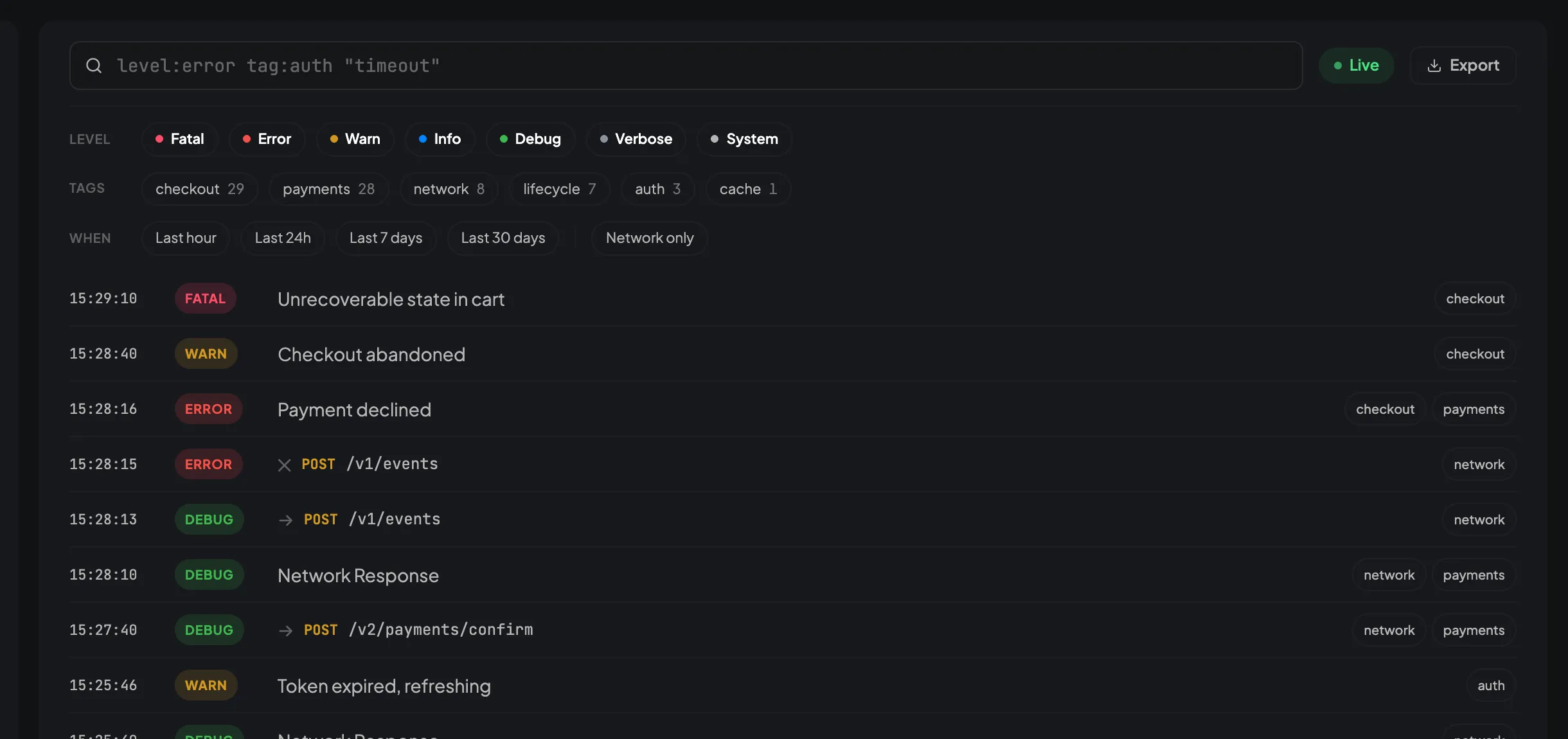
Every log your app wrote, searchable
Seven levels, your own tags, and structured metadata on any line. Switch levels off, narrow to a tag, jump to a time window, and the list keeps up as you go.
Search the way you think: level:error tag:checkout last:24h, or user:ada@example.com for everything one person hit.
Network calls sit in the same stream as the logs around them, so you read a request in the context of what the app was doing when it made it.
Errors
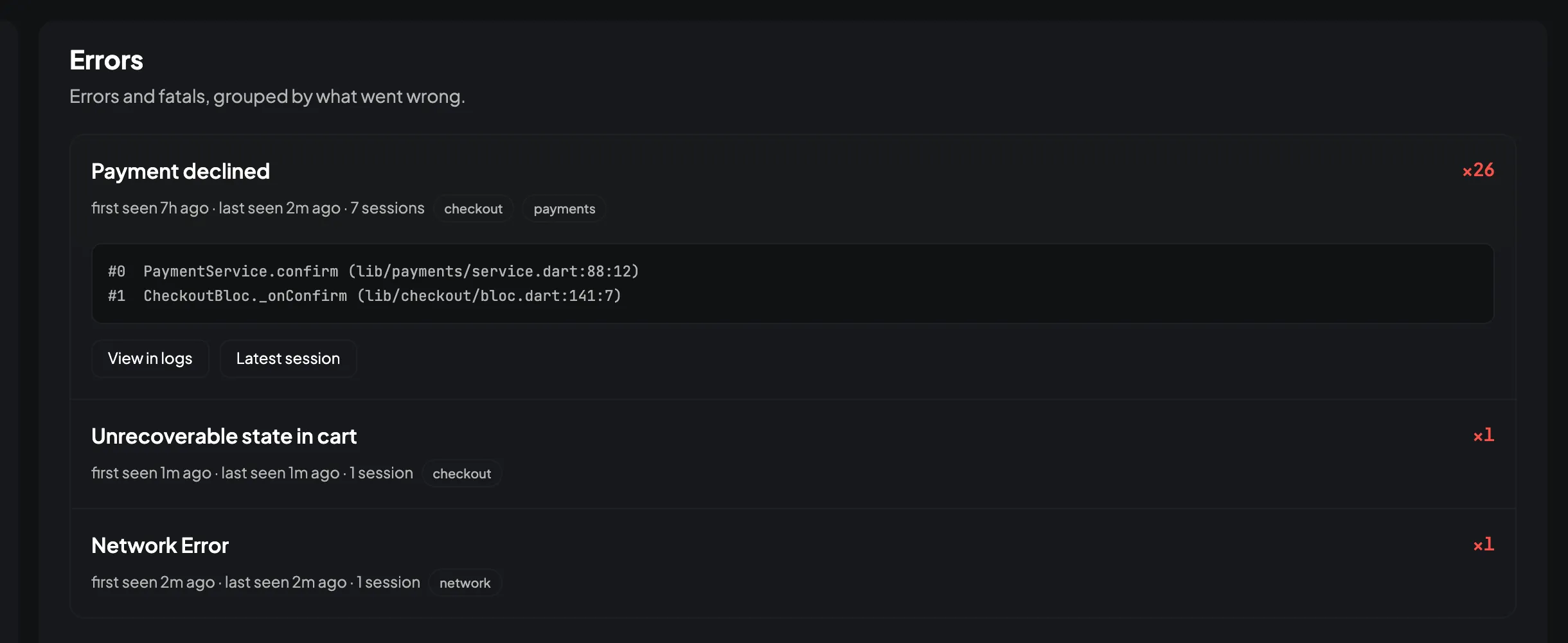
One bug is one row, however many times it happened
Twenty-six copies of the same failure collapse into one line with a count and the sessions it touched, so this morning's new bug is not buried under last week's.
Grouping survives the parts that always differ. User 4821 not found and User 9134 not found are one problem, and two failing endpoints stay two.
Open a row for the latest stack trace, then jump to every occurrence in the logs or to the launch it last happened in.
Sessions
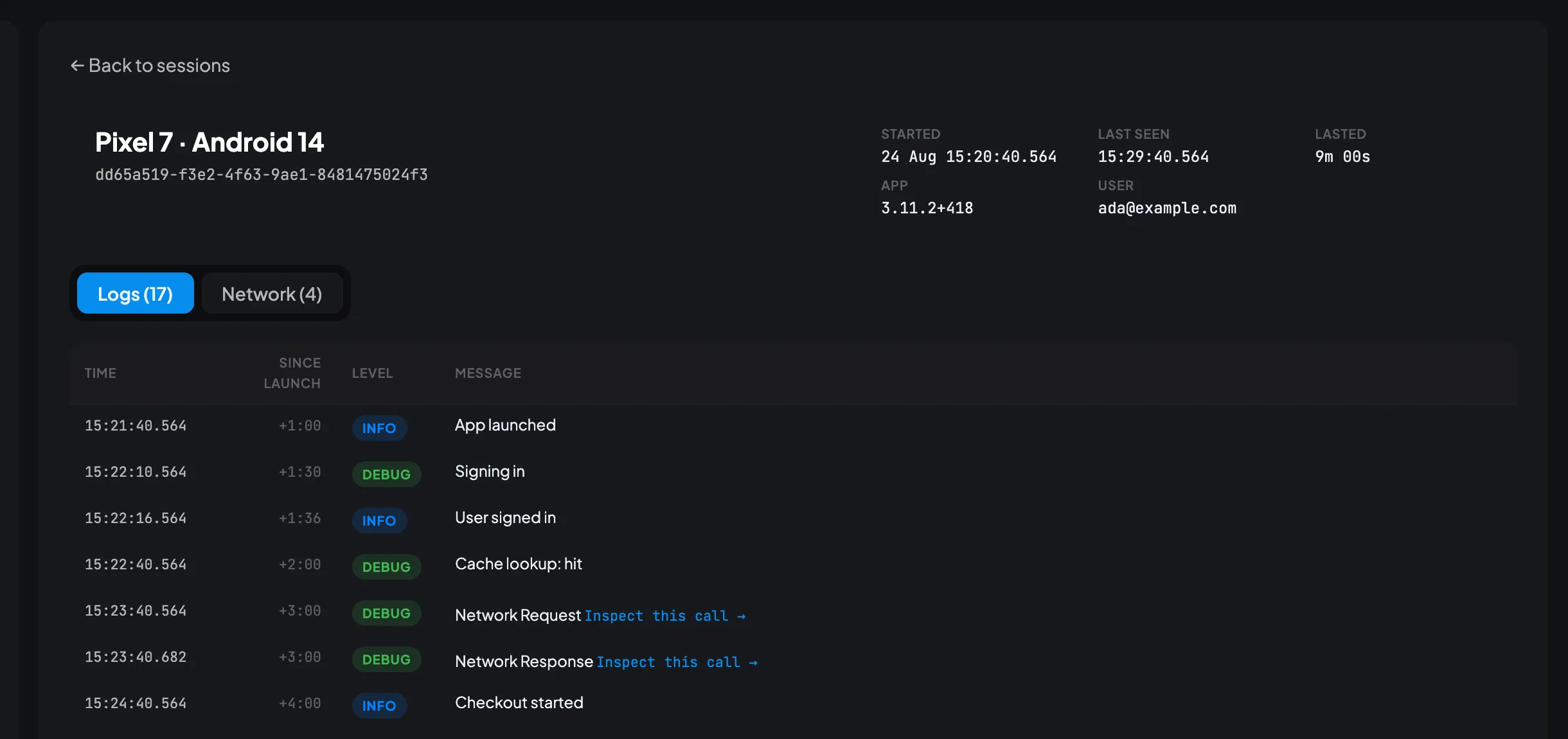
Replay one launch, in order
One run of the app from first frame to last, with the time since launch on every row. Usually that is enough to see what the person actually did.
The device, the OS, the app version and the build come with it, so "only on Android 13" stops being a hunch somebody has to go and check.
Call setUser() when someone signs in and the whole launch is attributed, including the logs written before you knew who they were.
Network
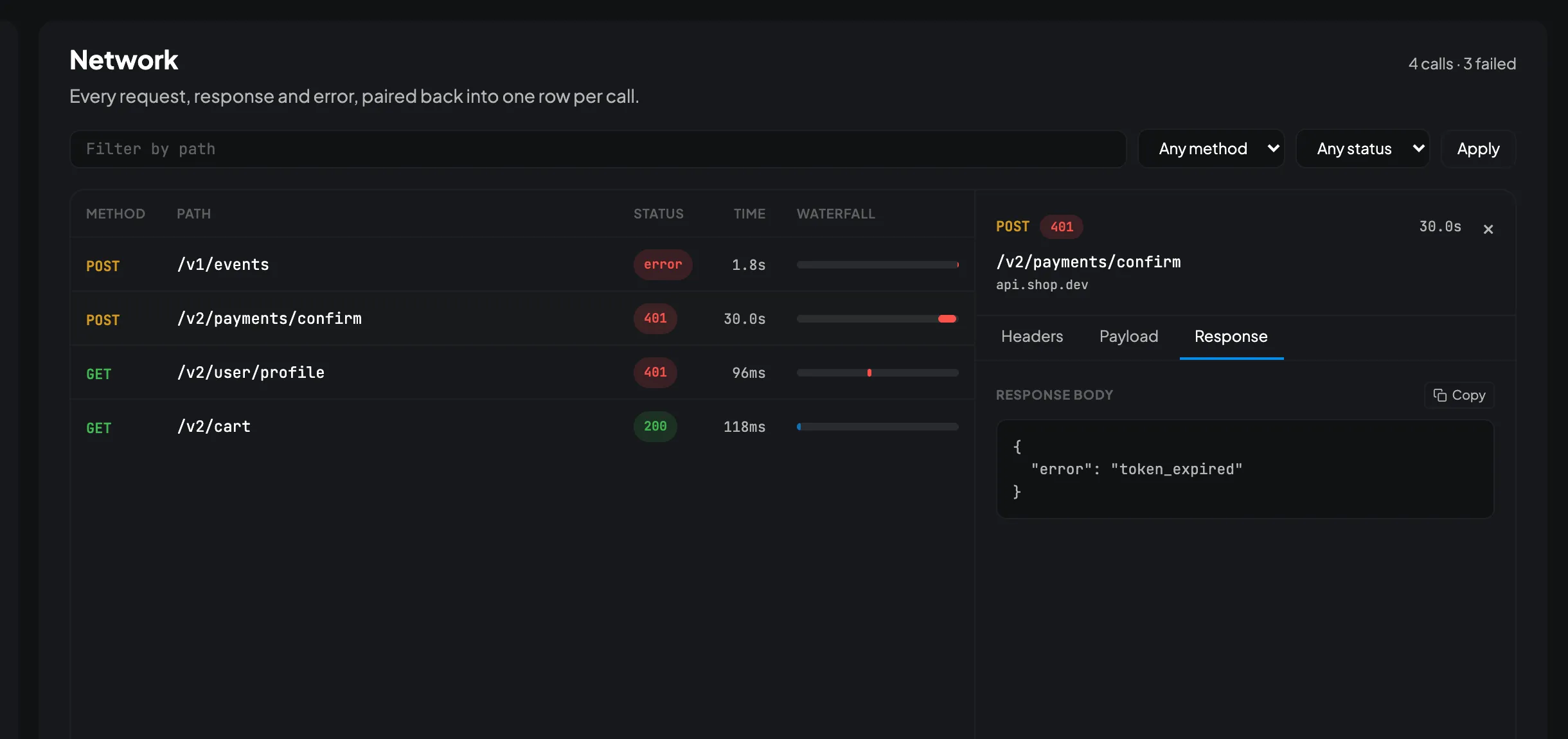
Every call the app made, and what came back
One row per request, with the status, how long it took and where the slow one is. Click it for the headers, the body it sent and the body it got.
Works with Dio or package:http. Add one line to the client you already have and every call is captured, including the ones that failed.
Find the calls that matter: everything one user did, everything from one phone model, everything from the version you shipped last Tuesday.
Live sessions
The bug you cannot reproduce
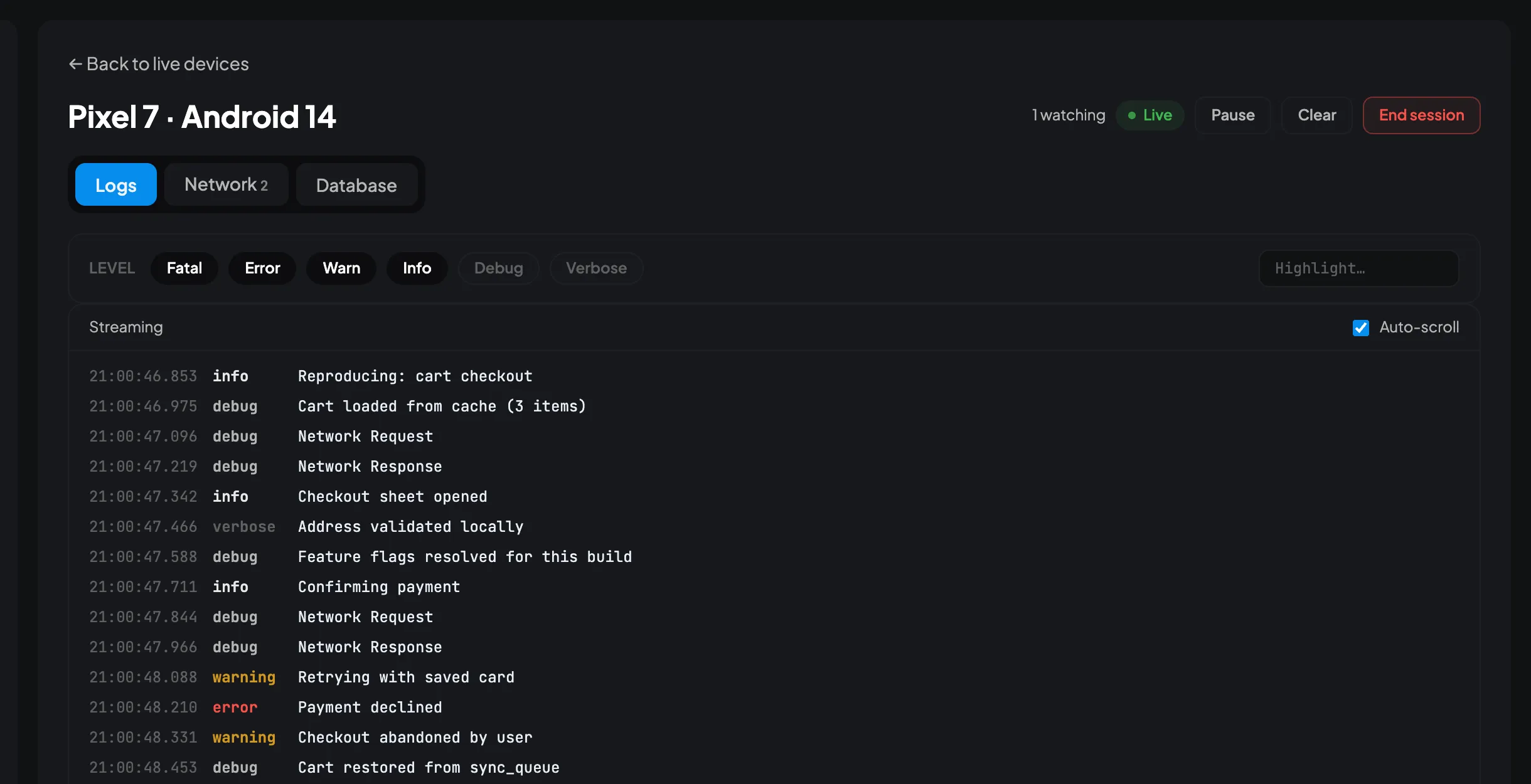
It happens on one tester's phone and nowhere else. Not in your logs, not on your simulator, and the build that would tell you more is another round trip through QA. Instead of guessing, watch that phone while they show you.
-
Ask for a minute of their time
Your dashboard shows a six character code. Read it down the phone or paste it into the chat you are already in.
-
They type it into your app
Into the CodeScout panel in the build they already have. Nothing to install, no account, no TestFlight round trip.
-
Ask them to do the thing that breaks
Their logs, their network calls and their local data arrive as they tap. You are reading the bug while it happens.
A code works once and dies after five minutes. The session lasts as long as the app is open, and none of it is written to your server. The alphabet leaves out O and 0, I and 1, because somebody is reading it down a bad line.
Database browser
Look inside the app while it is running
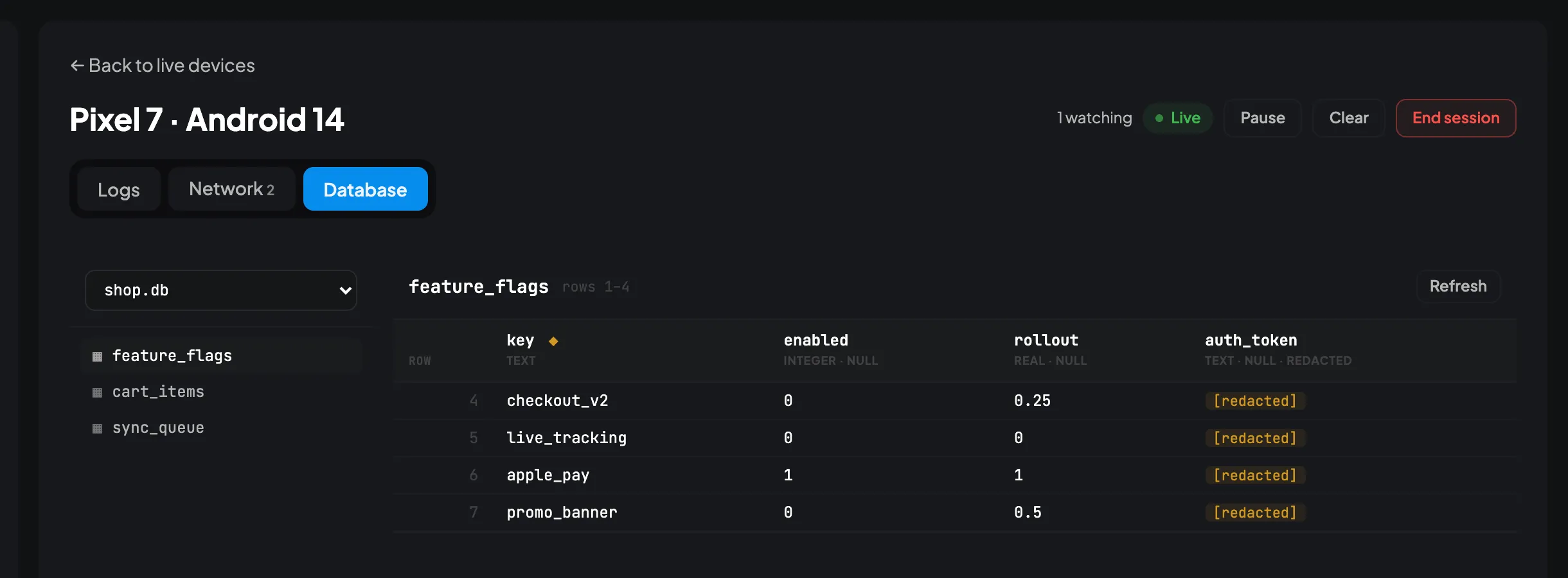
Half of "cannot reproduce" is stale data on someone's phone. Open their SQLite tables, shared_preferences and Hive boxes and read what is actually there, instead of asking them to describe it.
Change one value and watch the app react. Flip a feature flag, clear a cached token, fix a row that got into a state your code cannot recover from.
You choose what is visible. Nothing appears until your app names it, nothing is editable unless you say so, and none of it is copied to your server.
For coding agents
Send the session id, not the screenshot
Your tester hits the bug and copies the session id out of the panel inside your app. That id is the whole bug report. Paste it to your coding agent and it reads the launch itself: every log in order, every network call with both bodies, the stack trace, the device and the build.
No more reconstructing what happened from a blurry video and a sentence that starts "it just doesn't work". The agent already has more than you would have thought to ask for.
{
  "mcpServers": {
    "code-scout": {
      "url": "https://logs.yourcompany.com/api/mcp",
      "headers": { "Authorization": "Bearer csp_…" }
    }
  }
}
A URL and a header. Claude Code, Cursor, VS Code, Windsurf and anything else that speaks MCP take the same two, spelled their own way.
All eighteen toolsYou
QA says checkout fails on a Pixel 7. Session
13bad31e.
What actually went wrong?
get_session_timeline(session_id: "13bad31e-…")
15 logs, 3 network calls, Pixel 7 · Android 14, app 3.11.2+418
get_network_request(request_id: "8f2c14a0-…")
POST /v2/pay → 402, request headers, both bodies
Agent
The token refresh at +5:06 came back 401, and the retry went out without
the new token attached. So
POST /v2/pay
used the expired one and the server answered 402.
PaymentService.confirm
treats every non-200 as a declined card, which is why your tester saw
"Payment declined" for what is actually an auth bug.
It is at
lib/payments/service.dart:88.
Want me to fix the retry to re-read the token?
Every tool is read-only, and a token can only reach the projects its owner can already see. Nothing an agent does here can write to your app or your database.
Not a crash reporter
A crash reporter tells you the app died and where. That is useful, and it is rarely the hard part. The hard part is the bug that does not crash: the payment that silently fails for one customer, the screen that loads empty on someone else's phone. CodeScout shows you the five minutes before. Most teams run both.
Before it sees a real user
- Nothing is hidden unless you say so
- Name the headers and fields you never want recorded and they are replaced on the phone, before the log is written. The rest is kept, because the token is sometimes the bug.
- Record a share of launches
- Chatty app, small budget? Keep one launch in ten. The choice is made once when the app starts, so the launches you keep are whole rather than a scattering of rows.
- A bad network costs you a delay
- Logs are written to the phone first and uploaded in batches. Tunnel, aeroplane, dead server: they wait, they retry, and they are still there when you land.
Once the data is in
- Send someone a search
- Every filter lives in the address bar, so the view you built is a link you can paste into a thread.
- Take the data with you
- Export to CSV or JSON, or tail it live in the browser. It is your Postgres and your disk either way.
- Set limits without a restart
- Change how long logs are kept, or cap what one project can send in a day. It applies to the next upload, not the next deploy.
On your own terms
- It runs on your machines
- One Go binary and a Postgres. No hosted version to sign up for, no telemetry, nothing phoning home.
- Decide who sees what
- The whole instance, one project, or read-only on one project. A project you cannot see does not appear at all.
- MIT licensed
- Free, and free to fork. No seats to count and no bill that grows with your traffic.
Quick start
Two minutes, and the second half is optional
Add the package, call
init(),
and you are done. You get colour coded console output, a history you can search
on the device, and a panel you can open inside your own app. No server, no
account, nothing leaves the phone.
The dashboard is the second half, and only when you want it. It is one binary and a Postgres on a machine you control. There is nothing to sign up for, because nothing is hosted today.
docker compose upimport 'package:code_scout/code_scout.dart';
import 'package:code_scout_dio/code_scout_dio.dart';
void main() async {
await CodeScout.instance.init(
configuration: CodeScoutConfiguration(
logging: LoggingBehavior(minimumLevel: LogLevel.all),
),
);
dio.interceptors.add(CodeScoutDioInterceptor());
CodeScout.instance.i('User signed in', tags: {'auth'});
runApp(const MyApp());
}import 'package:http/http.dart' as http;
import 'package:code_scout/code_scout.dart';
import 'package:code_scout_http/code_scout_http.dart';
void main() async {
await CodeScout.instance.init(
configuration: CodeScoutConfiguration(
logging: LoggingBehavior(minimumLevel: LogLevel.all),
),
);
final client = CodeScoutHttpClient(client: http.Client());
final response = await client.get(Uri.parse('https://api.example.com/users'));
runApp(const MyApp());
}// Both packages export a LogLevel, so hide the one you are not using.
import 'package:talker/talker.dart' hide LogLevel;
import 'package:code_scout/code_scout.dart';
import 'package:code_scout_talker/code_scout_talker.dart';
void main() async {
await CodeScout.instance.init(
configuration: CodeScoutConfiguration(
logging: LoggingBehavior(minimumLevel: LogLevel.all),
),
);
final talker = Talker(observer: CodeScoutTalkerObserver());
talker.info('User signed in');
runApp(const MyApp());
}Already logging with Talker? One observer forwards everything it sees, and nothing about your logging changes. Each integration lives in its own companion package, so the core SDK stays free of third-party dependencies.